AWS Common Designed Architecture & Glossary
Intro
This post aims to note common-used AWS architectures, also bring out explanations & analytics for each one.
Glossary
Storage/Data Tier - Level of access
- Hot Storage
- Access Speed: Fastest, optimized for frequently accessed data.
- Cost: Most expensive due to performance optimization.
- Use Cases: High-performance computing, real-time analytics, frequently accessed applications.
- Warm Storage:
- Access Speed: Slower than hot storage, but still relatively quick.
- Cost: Less expensive than hot storage.
- Use Cases: Data used for reporting, analytics, or data that needs to be accessed occasionally but not frequently.
- Cold Storage:
- Access Speed: Slowest, with potential delays for retrieval.
- Cost: Least expensive.
- Use Cases: Archiving, long-term data retention, infrequently accessed data.
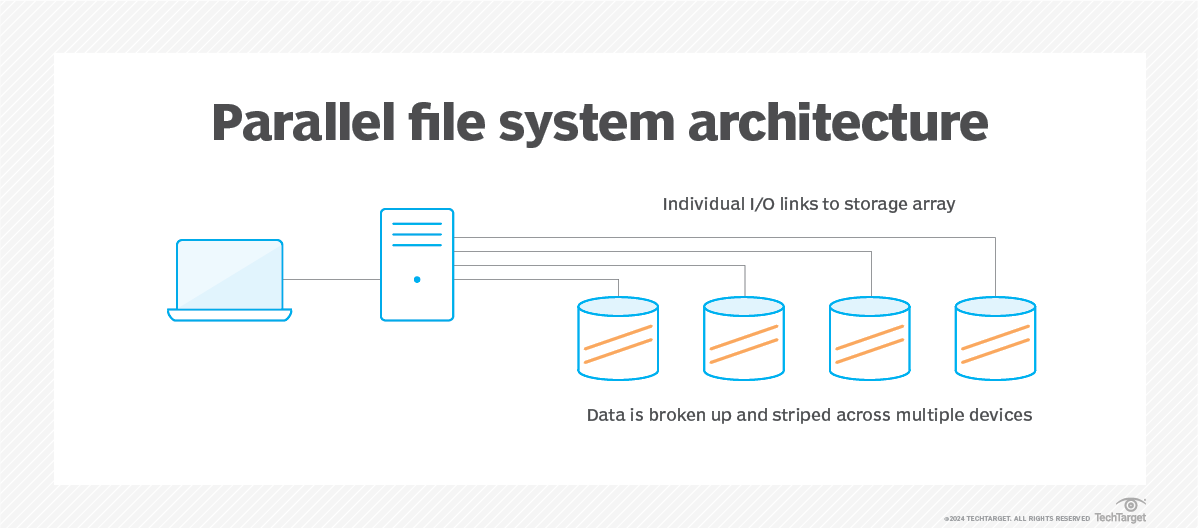
Parallel file system:
- Is a software component designed to store data across multiple networked servers. It facilitates high-performance access through simultaneous, coordinated input/output (I/O) operations between clients and storage nodes.
- Parallel file system can span thousands of server nodes and manage petabytes of data. Users typically deploy high-speed networking, such as Fast Ethernet, InfiniBand and proprietary technologies, to optimize the I/O path and enable greater bandwidth.
Serverless:
- A cloud-native development model that allows to run applications without having to manage servers.
- It doesn’t mean there are no servers, it means the servers are abstracted away from application development. A cloud provider handles the routine work of provisioning, maintaining, and scaling the server infrastructure.
- Serverless apps respond to demand and automatically scale up or down as needed. When a serverless function is sitting idle, it doesn’t cost anything.
Reference:
- https://www.techtarget.com/searchstorage/definition/parallel-file-system
- https://www.redhat.com/en/topics/cloud-native-apps/what-is-serverless
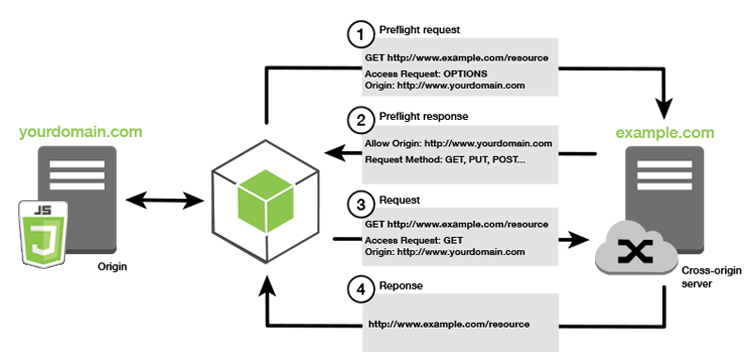
Cross-origin resource sharing (CORS) defines a way for client web applications that are loaded in one domain to interact with resources in a different domain. With CORS support, you can build rich client-side web applications with Amazon S3 and selectively allow cross-origin access to your Amazon S3 resources.
High-cardinality (In database term) refers to columns with values that are unique. High-cardinality column values are typically ID number, email, user name or the combination of these. In general definition, “High-cardinality” means the characteristic of multiple possible unique value of an object. There are many problem handling high-cardinality data structure like IOT scenario, database partitioning, …
Read more: https://khangtictoc.github.io/posts/storage-data-consistency-and-partition/
Common Architecture
1. Fan-out Pattern
The fan-out pattern is a messaging or workload distribution pattern where a single message or task is sent to multiple downstream consumers or workers for parallel processing. It enhances scalability and decouples producers from consumers.
How it Works
- A producer sends a message to a central messaging system (e.g., a queue or topic).
- The messaging system distributes (“fans out”) the message to multiple consumers.
- Each consumer processes the message independently, often in parallel.
AWS Example
In AWS, the fan-out pattern is commonly implemented using Amazon SNS (Simple Notification Service) and SQS (Simple Queue Service):
- Scenario: An e-commerce platform processes an order by notifying services like inventory management, payment processing, and shipping.
- Implementation:
- An application publishes an order event to an SNS topic.
- The SNS topic fans out the message to multiple SQS queues (e.g.,
InventoryQueue,PaymentQueue,ShippingQueue). - Each queue is processed by a service, such as a Lambda function or EC2 instance.
- AWS Services:
- SNS + SQS: SNS topic fans out to SQS queues, processed by Lambda or other services.
- Kinesis Data Streams: A stream fans out to multiple consumers (e.g., Lambda functions).
- EventBridge: An event bus distributes events to multiple targets (e.g., Lambda, ECS).
- Benefits:
- Scalability: Independent scaling of consumers.
- Decoupling: Producer is unaware of consumer details.
- Parallel Processing: Multiple services handle the same event concurrently.
- Use Case: A video processing application uploads a video to S3, triggering an SNS topic that fans out to SQS queues for thumbnail generation, transcoding, and metadata extraction.
2. Blue-Green Deployment
Blue-green deployment is a release strategy that reduces downtime and risk by maintaining two identical environments: one active (blue) and one idle (green). The new version is deployed to the green environment, tested, and then traffic is switched from blue to green.
How it Works
- Blue Environment: Current production environment serving live traffic.
- Green Environment: New environment with the updated application, initially idle.
- Traffic is switched from blue to green (e.g., via DNS or load balancer) after testing.
- The blue environment remains available for rollback if issues arise.
AWS Example
- Implementation:
- Use AWS Elastic Load Balancer (ELB) with Auto Scaling Groups (ASGs).
- Blue: ASG with the current version behind ELB.
- Green: ASG with the new version behind the same ELB.
- Use AWS CodeDeploy to switch traffic from blue to green.
- Benefits:
- Zero downtime with instant traffic switching.
- Easy rollback to the blue environment.
- Full testing in the green environment before going live.
- Challenges:
- Duplicated infrastructure increases costs.
- Database migrations require careful handling.
- Use Case: Deploying a new version of an SAP HANA-integrated application on EC2, using CodeDeploy to switch traffic between ASGs.
3. Canary Deployment
Canary deployment is a release strategy where a new version is rolled out to a small subset of users for testing before a full deployment. It minimizes risk by validating the new version in production.
How it Works
- The new version (canary) runs alongside the stable version.
- A small percentage of traffic (e.g., 5%) is routed to the canary version.
- Monitoring tools check the canary’s performance (e.g., errors, latency).
- Traffic is gradually shifted to the canary if it performs well, or rolled back if it fails.
AWS Example
- Implementation:
- Use AWS Application Load Balancer (ALB) with weighted target groups.
- Stable: Target group A (95% traffic).
- Canary: Target group B (5% traffic).
- Use AWS CodeDeploy or ALB rules to shift traffic incrementally.
- Monitor with Amazon CloudWatch.
- Benefits:
- Low risk: Issues affect only a small user base.
- Real-world testing with actual traffic.
- Granular control over traffic distribution.
- Challenges:
- Requires advanced routing and monitoring.
- Session persistence may be needed.
- Use Case: Rolling out a new feature for a web application, using ALB to route 10% of traffic to the canary version with CloudWatch monitoring.