AWS Service Configuration & Operation Cheatsheet
Intro
This post aims to note AWS hard-to-understand configuration for AWS Services.
Service Summary
Compute
EC2
Storage/Disk
Instance Store volume: a temporary block-level storage for EC2 instances
Monitoring
Default metrics:
- CPU
- Network/Bandwidth, Read/Write bytes
Not-ready metrics:
- Memory, Disk I/O:
- Memory utilization
- Disk swap utilization
- Disk space utilization
- Page file utilization
- Log collection
Install metrics:
- Memory, Disk I/O: Install the Amazon CloudWatch agent to all the EC2 instances. View the custom metrics in the CloudWatch console.
Dynamic scaling policy
Types: Simple scaling
- Based on CloudWatch alarm.
- Choose 1 action to conduct.
- Scale-in operation depends on CloudWatch alarm.
Target tracking policy
- Based on CloudWatch & built-in metrics (i.e Averge CPU Utilization). CloudWatch metrics must be available or defined.
- Scale (in/out) operations trigger by calculating the current resources utilization that matches the defined target metric.
- Faster scale-in operation.
Step scaling
- It is a
Simple scalingwith various actions. - Apply multiple actions for a scaling events.
- Allow scaling operation more smoothly and optimized.
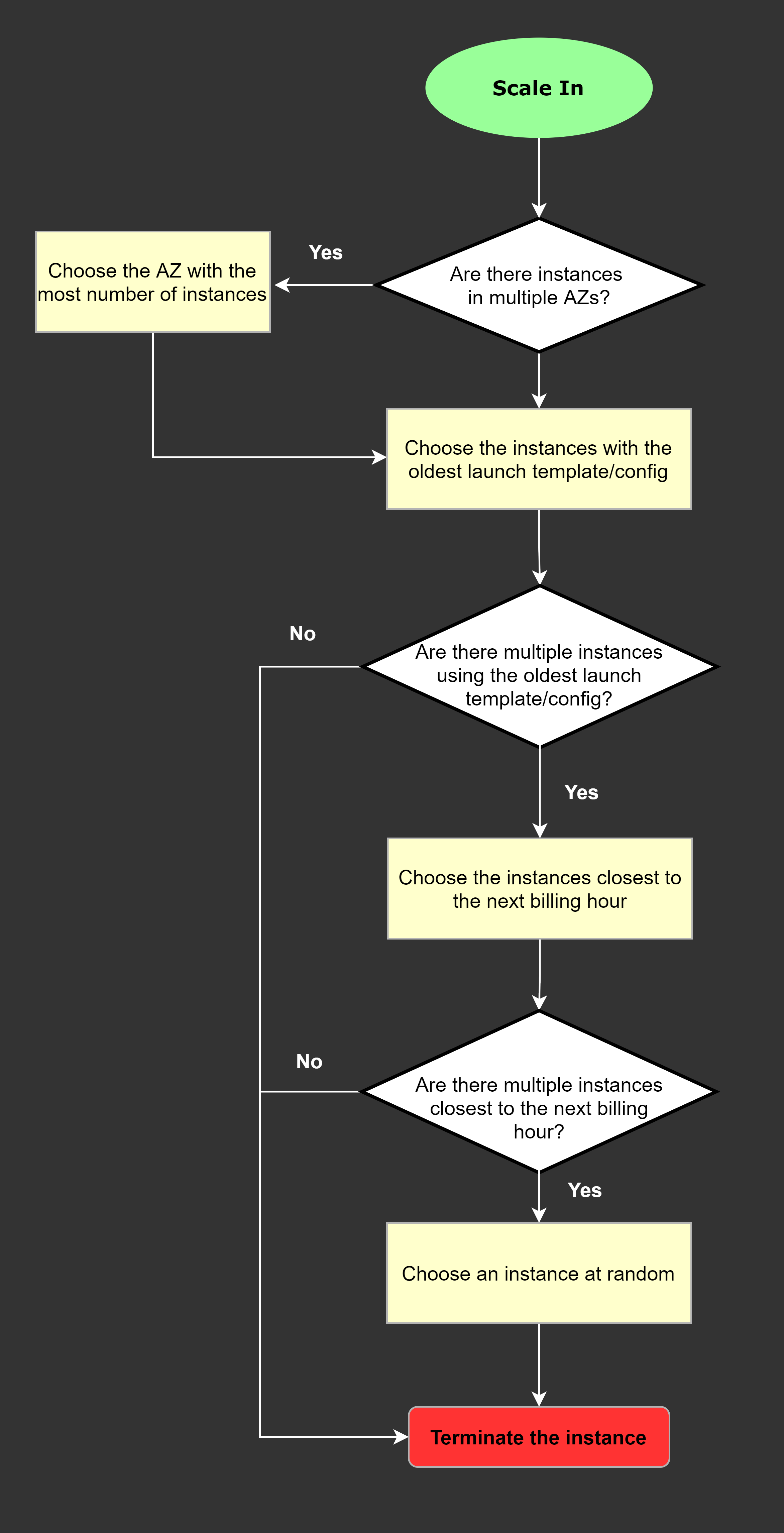
Scale-In Mechanism
Auto Scaling services choose below critiria to perform terminate EC2 instances
Priority:
- AZ has the most VMs
- Oldest launch templates (lowest version)
- Closet to next billing hour
- RANDOM if can’t decide more.
Operation
Take snapshot & restore
Annotations:
- Source instance to take snapshot:
instance A - Destinated instance to perform restore:
instance B
Steps:
- Take snapshot of a running
instance A’s volumes. We havesnapshot A - Create a new volume from
snapshot A. We havevolume A - On the target
instance B, shutdown the instance. - Force detachment on the
volume Bofinstance B. Then delete the volume if not use anymore - Attach the new
volume Atoinstance B. - Start
instance B. - Verify the
instance Bwith new snapshotsnapshot A
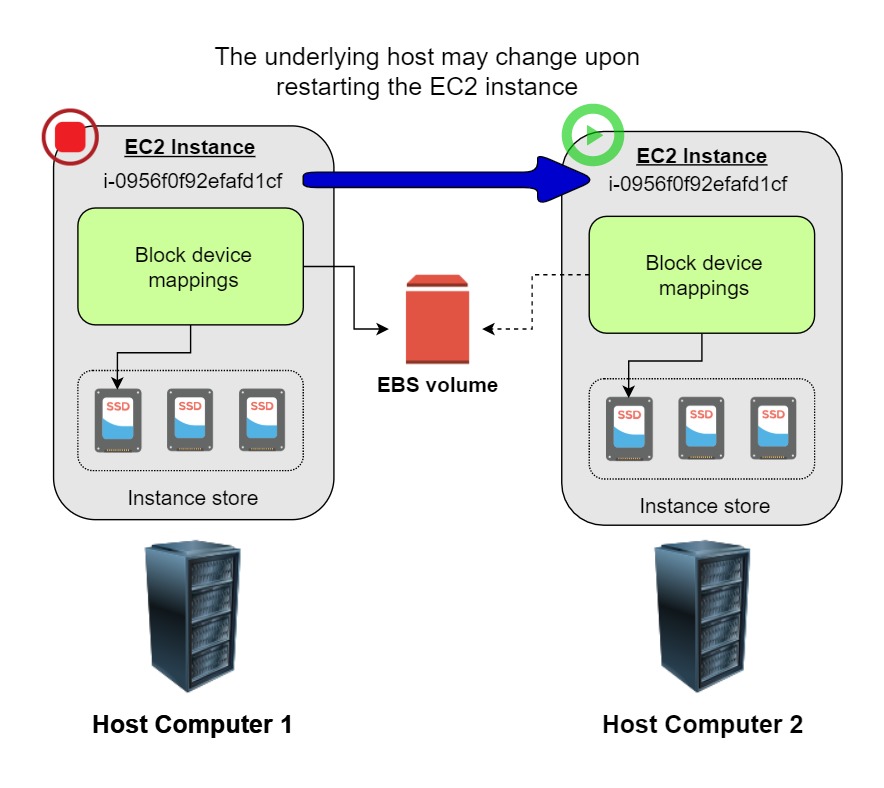
Restart instance
Notes:
- Only EBS-backed instances can be stopped and restarted
- Store-backed instance can only be rebooted or terminated, and its data will be erased if the EC2 instance is either stopped or terminated.
Keep-in-mind:
- When stopping an EBS-backed EC2 instance, the volume is preserved, but the data in any attached instance store volume will be erased.
- An EC2 instance has an underlying physical host computer. If the instance is stopped, AWS usually moves the instance to a new host computer.
- Your instance may stay on the same host computer if there are no problems with the host computer.
- In addition, its Elastic IP address is disassociated from the instance if it is an EC2-Classic instance. Otherwise, if it is an EC2-VPC instance, the Elastic IP address remains associated.
Stop Reserved instances
- Go to the AWS Reserved Instance Marketplace and sell the Reserved instances.
- Terminate the Reserved instances as soon as possible to avoid getting billed at the on-demand price when it expires.
Reference: EC2 instance Stop/Start
Load Balancer
Application Load Balancer
Main features
- Layer-7 OSI load balancer
- Can not assign Elastic IP
Configurations
- Hibernation Mode: It is not possible to enable or disable for an instance after it has been launched -> Migrate to an EC2 instance with hibernation enabled.
Network Load Balancer
- Layer-4 OSI load balancer
- Can assign Elastic IP
Billing
Instance state lifecycle
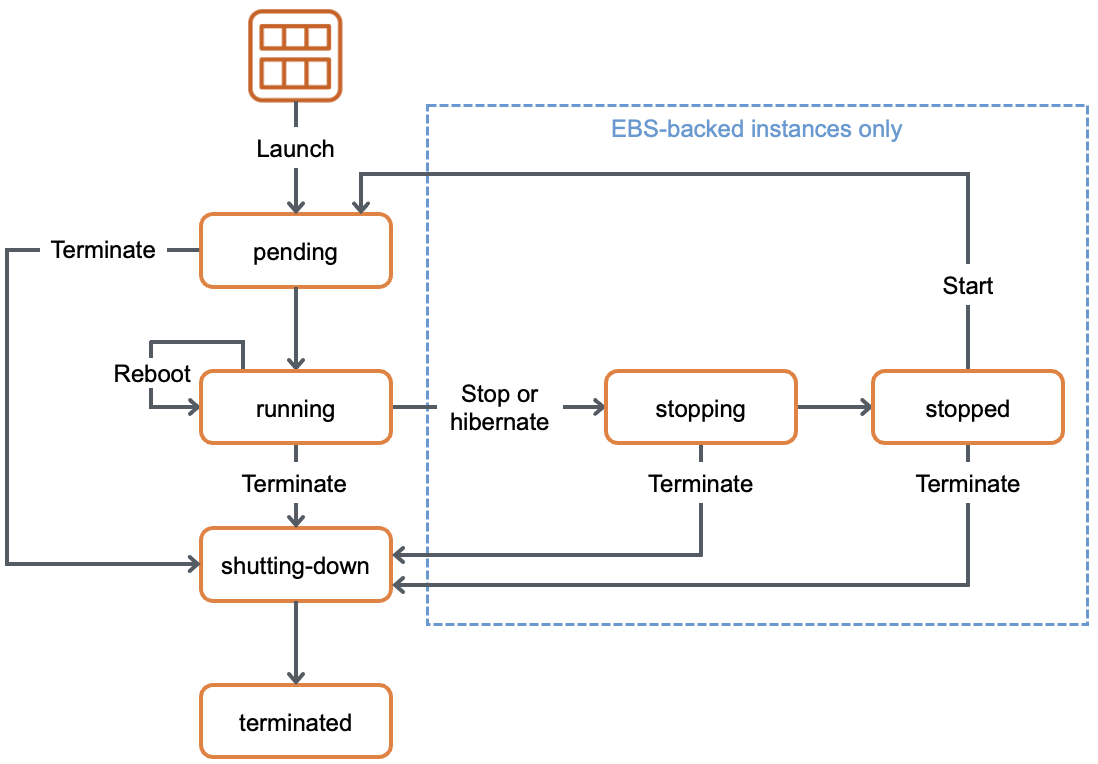
Below are the valid EC2 lifecycle instance states:
| Instance state | Description | Instance usage billing |
|---|---|---|
| pending | The instance is preparing to enter the running state. An instance enters the pending state when it is launched or when it is started after being in the stopped state. | Not billed |
| running | The instance is running and ready for use. | Billed |
| stopping | The instance is preparing to be stopped. Note: If you hibernate an instance, you’re billed while the instance is in the stopping state. | Not billed |
| stopped | The instance is shut down and cannot be used. The instance can be started at any time. | Not billed |
| shutting-down | The instance is preparing to be terminated. | Not billed |
| terminated | The instance has been permanently deleted and cannot be started. Note: Reserved Instances that applied to terminated instances are billed until the end of their term according to their payment option. | Not billed |
Reference: Instance state lifecycle
Analytics
AWS Glue
Main features
- Enables data engineers to build and manage ETL(extract, transform, load) pipelines for processing and analyzing large amounts of data
Configurations
- Job Bookmarking: A mechanism that allows AWS Glue to keep track of where a job is left off in case it gets interrupted or fails for any reason. This way, when the job is restarted, it can pick up from where it left off instead of starting from scratch.
Application Integration
Simple Queue Service (SQS)
Main features
- Create a queue of messages
- Expose an endpoint and wait for other applications to consume
- Producer/Consumer architecture
NOTE: Can be combined with SNS to create Fan-out architecture.
Simple Notification Service (SNS)
Main features
- Create a queue of messages, stored in Topic
- A service or application will register (subscribe) a Topic.
- Whenever a message is pushed (publish) in a SNS Topic, immediately push to a subscribed endpoint
- Pub/Sub architecture
NOTE: Can be combined with SQS to create Fan-out architecture.
Containers
Elastic Kubernetes Service (EKS)
Configuration
- Secret encryption (On/Off): with a AWS KMS -> Encrypt sensitive data stored in etcd
- ARC Zonal shift:
- By default, this feature is Disabled
- If enabled, there would be an Amazon Application Recovery Controller’s (ARC) zonal shift which monitors AZ health
- Benefits:
- Shift traffic: When an AZ is impaired, ARC reroutes traffic to healthy zones, ensuring workloads remain accessible.
- Improved availability, Reduced downtime Keeps applications running even during partial outages => Reacts faster than native K8s.
- Complementary to Kubernetes: Works alongside Kubernetes’ native resilience mechanisms for stronger fault tolerance.
Database
DynamoDB
Main features
- NoSQL database
Configuration
DynamoDB Accelerator (DAX) used to significantly improve the in-memory read performance of your database
A DynamoDB stream is an ordered flow of information about changes to items in an Amazon DynamoDB table. When you enable a stream on a table, DynamoDB captures information about every modification to data items in the table to process further tasks
Amazon Kinesis Client Library (KCL) is a coding module to write an application that leverages on DynamoDB Streams Kinesis Adapter that will fetch data from the DynamoDB Streams endpoint.
Point-in-Time Recovery (PITR) is a backup features:
- Take snapshot at any point of time
- Store short-term snapshots
- Optimized solution for RPO/RTO metric.
Redshift
Main features
- Data warehousing solution
- Built on a relational database model
RDS
Main features
- Multi-AZ failover: Decrease failover rate beside solely using Multi-AZ deployment.
Configuration
Enhanced Monitoring: monitor how the different processes or threads on a DB instance use the CPU, including the percentage of the CPU bandwidth and total memory consumed by each process.
Amazon Aurora
A cluster of DB instances
Main features
- Provide “Connection” mechanism:
- Each connection is handled by a specific DB instance
- When connecting to an Aurora cluster, the host name and port that you specify point to an intermediate handler called an “endpoint” => Abstract these connections
- Advantages:
- Don’t have to hardcode hostnames or write logic for load-balancing and rerouting connections when DB instances aren’t available.
- Different instances or groups perform different roles: Heavy-workload tasks will be redirected to high-capacity endpoints and vice versa.
Configuration
Parallel Query: enables Amazon Aurora to distribute the computational load of a single query across thousands of CPUs in Aurora’s storage layer
ElastiCache
Configuration
- Encryption at rest: Encrypt stored data in DB.
- Encryption in transit: Encrypt transfered data, sent command, delivered metadata, …
- AUTH default user access: Enable redis AUTH to authenticate with database when executing commands. Only enable through command.
Machine Learning
Amazon Comprehend
Main Features
- Determine the sentiment of a document
- A fully managed artificial intelligence (AI) service
Example
- Determine the sentiments of comments on a blog posting or a transcribed call to determine if your users loved or hated your content
Amazon Translate
Main Features
- Translate non-english texts into English
- A fully managed artificial intelligence (AI) service
Amazon Transcribe
Main Features
- Convert audio recordings into text
- A fully managed artificial intelligence (AI) service
Amazon Rekognition
Main Features
- Recognize images
- A fully managed artificial intelligence (AI) service
Example
- Determine nudity, sensitiveness, … of an image
- Category animal’s breeds, genders, type, …
Amazon Lex
Main Features
- A fully managed artificial intelligence (AI) service
- Using natural language models that can help you design, build, test, and deploy conversational interfaces or chatbots
Amazon Kendra
Main Features
- A fully managed artificial intelligence (AI) service
- Highly accurate and easy-to-use enterprise search service for all unstructured data that you store in AWS
Amazon Detective
Main Features
- A fully managed artificial intelligence (AI) service
- A security service that analyzes and visualizes security data to rapidly get to the root cause of your potential security issues.
Amazon SageMaker
Main Features
- A platform like Google Colab
- Allow you to freely build your customized models
- Use AWS built model to be used or further enhanced
Management & Governance
Service Quotas
Operations
Increase Quotas
- Submit form for increasing quotas number for specific configuration to AWS.
- Wait for approve and observe the new changed quotas
Networking & Content Delivery
API Gateway
Main features
- Throttling at multiple levels including global and by service call
- Add caching to API calls by provisioning an Amazon API Gateway cache and specifying its size in gigabytes.
CloudFront
Main features
- Caching static files (images, HTML, CSS, Javascript, …), front-end content website.
- Caching response contents for a request
- Integrate Lambda@Edge to handle 4 type of requests:
- After CloudFront receives a request from a viewer (viewer request)
- Before CloudFront forwards the request to the origin (origin request)
- After CloudFront receives the response from the origin (origin response)
- Before CloudFront forwards the response to the viewer (viewer response)
HTTP 504 (Gateway Timeout) errors from CloudFront mean that CloudFront didn’t get a timely response from your origin. General reason: origin takes long time to process request/response:
- Data base query slow
- Backend processes not efficiently
- Large data
- …
AWS Global Accelerator
Main features
- Suitable for non-HTTP use cases, such as gaming (UDP), IoT (MQTT), or Voice over IP, as well as for HTTP use cases that specifically require static IP addresses or deterministic, fast regional failover
VPC
AWS Network Firewall
Main features
- Supports domain name stateful network traffic inspection -> Create
AllowandDenylists with domain names. - NOT AN INTEGRATION SERVICES to any other resources like ELB, API Gateway, …
- A feature that exists in VPC, created as a resource separately in VPC, requires route table to route traffic through it if we need to apply network policies.
Security, Identity, & Compliance
AWS WAF
Configuration
Regular rule: Match condition only
Rate-based rule: Match condition & apply throttling
Storage
Simple Storage Service (S3)
Main Features
Fast-up data transfer:
- Enable Transfer Acceleration in the destination bucket
- Upload the collected data using Multipart Upload.
Configuration
Object Lock
- Enable/Disable to lock on “Objects”
With Bucket Versioning enabled, bucket are controlled with more features:
Default retention mode:
- Governance:
- Can’t overwrite or delete an object version or alter its settings unless having special permissions.
- To override or remove this settings, the TWO following conditions MUST BE SATISFIED:
- Must have the
s3:BypassGovernanceRetentionpermission - include
x-amz-bypass-governance-retention:trueas a request header with any request that requires overriding governance mode.
- Must have the
- Compliance:
- Can’t overwrite or delete an object version or alter its settings, including the root user in your AWS account.
- For compliance purpose in a specific duration.
In compliance mode, a protected object version can’t be overwritten or deleted by any user, including the root user in your AWS account. When an object is locked in compliance mode, its retention mode can’t be changed, and its retention period can’t be shortened. Compliance mode helps ensure that an object version can’t be overwritten or deleted for the duration of the retention period.
To override or remove governance-mode settings
Object Lock legal hold:
- Apply for “Objects”.
- Like “retention period”, prevent object from being deleted or overwritten.
Elastic Filesystem Storage (EFS)
Configuration
- EFS lifecycle policies: maximum days is only up to 365 days
Elastic Block Storage (EBS)
Main Features
- Snapshots are stored in S3 bucket.
Configuration
Amazon Data Lifecycle Manager (Amazon DLM): define policies that govern the lifecycle of these snapshots, ensuring regular backups are created and obsolete snapshots are automatically removed.
Amazon Storage Gateway
Main Features
- Used for creating a backup of data from your on-premises
- Providing low-latency access to data by caching frequently accessed data on-premises
AWS DataSync
Main Features
- Makes it simple and fast to move large amounts of data online between on-premises storage and Amazon S3, Amazon Elastic File System (Amazon EFS), or Amazon FSx for Windows File Server
AWS Backup
Main Features
- Retention policy up to unlimited days. Automated backup for RDS Database supports the maximum of 35 days for retention policy
- Cross-account backup